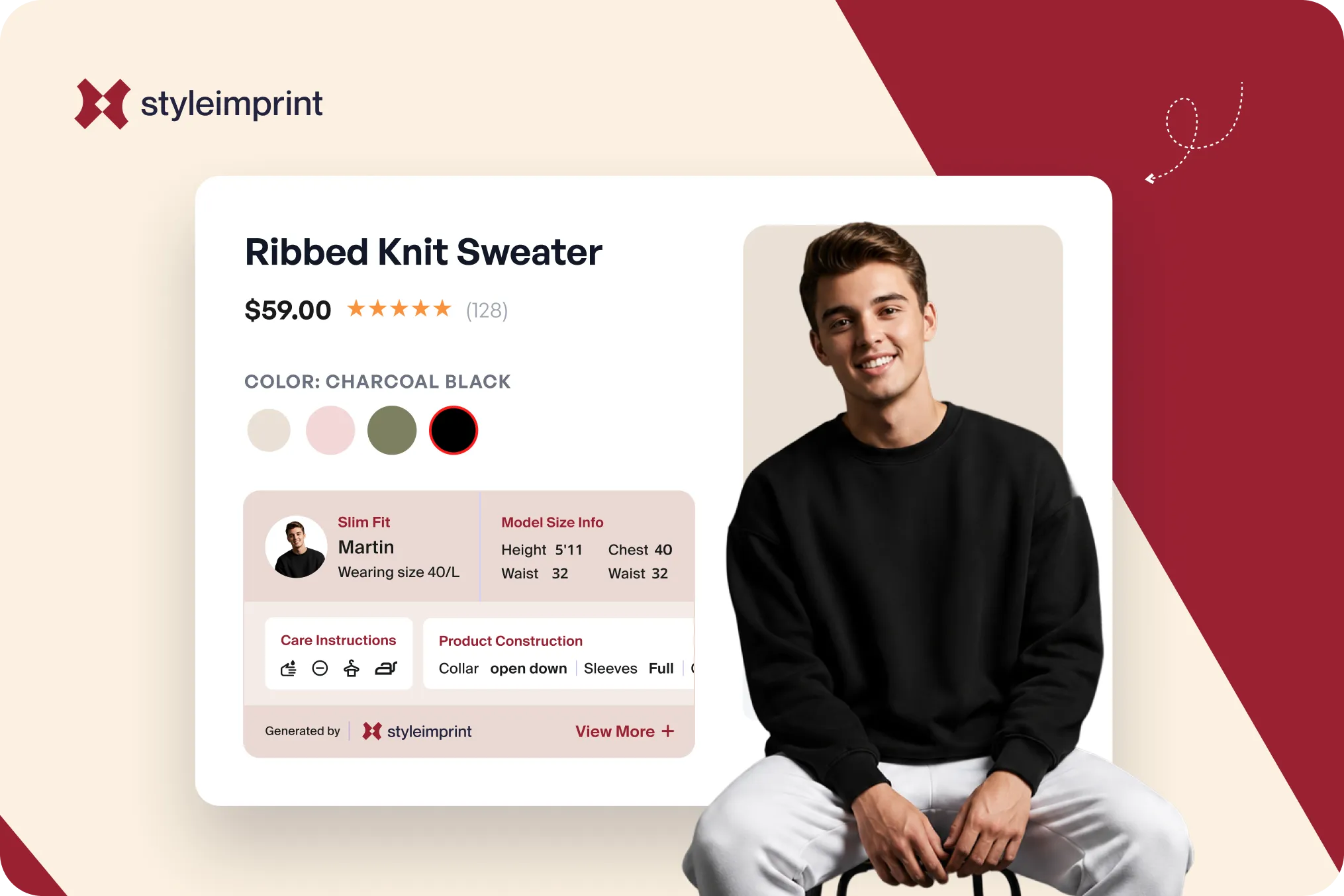
Most fashion product pages handle fit with a single line: “Model is wearing size M.” Then they stop. That half-sentence is doing almost none of the work it could, and it leaves the shopper to guess at the one thing standing between them and the buy button.
A person shopping online cannot try the garment on. They cannot hold it against their shoulders or check where the hem lands. The model is their only reference body, and “size M” tells them what the model wore, not whether it will fit the person reading the page. The question every apparel shopper is actually asking is simple: will this fit me? A model measurement strip is the cheapest, fastest way to answer it.
This guide covers what a complete model measurement strip contains, why it matters for returns, three ways to add one to a Shopify store, and how to adapt it for Indian ethnic wear where Western S, M, L sizing does not map cleanly.
Why “model is wearing size M” is not enough
The shopper’s real task on a product page is to map the model’s body onto their own. “Size M” alone gives them nothing to map. A 5’4” model and a 6’1” model can both wear a medium, and the same garment will sit completely differently on each. Without the model’s height and build, the size label is a number floating in space.
This matters because fit is the single biggest reason fashion comes back. McKinsey, in its apparel returns research “Returning to Order,” reported that roughly 70 percent of fashion returns relate to fit, size, or style. Returns are not a rounding error either: the National Retail Federation and Happy Returns estimated that 16.9 percent of 2024 retail sales were returned, around 890 billion dollars in merchandise. Every return that traces back to “it did not fit the way I expected” is a return that better fit information on the page might have prevented.
The fix is not expensive. The model already has a height and a set of measurements. The garment already has a size on the model. Putting those facts on the page, in a form the shopper can actually read, is close to free and directly targets the most common reason for a return.
What a complete measurement strip looks like
ASOS is the reference standard here. Under the images on an ASOS product page, you will find two short lines: the size the model is wearing, written across regions (for example “Model wears: UK 8/ EU 36/ US 4”), and the model’s height (for example “Model’s height: 180 cm/5’11""). Two facts, stated plainly, positioned where the eye lands. That is the whole pattern, and it works.
A complete strip usually contains the model’s height, the key body measurements (bust or chest, waist, and hip), and the size the model is wearing. The best fashion stores go one step further and show more than one model in different sizes for the same garment, so a petite shopper and a tall shopper each get a reference body close to their own rather than a single mannequin that represents nobody in particular.
The reason a strip beats a buried sentence is how people read online. Nielsen Norman Group’s eye-tracking work established the F-shaped scanning pattern: shoppers skim the top and left and skip dense text, reading at most around 20 to 28 percent of the words on a page. Nielsen separately found the average online purchase decision takes about 19 seconds. A labeled measurement strip is caught in that window. A sentence tucked into the third paragraph of a description is not.
This is part of a bigger gap. Baymard Institute found that 90 percent of apparel sites fail to let shoppers properly assess the appearance, size, or fit of a product. Model measurements are one of the most direct ways to close that gap, and most stores still leave them out.
Three ways to add model measurements on Shopify
Shopify does not ship a dedicated model-measurement field, so there are three honest routes, from most manual to most scalable.
Option one: hardcode in the theme. You edit the product template in Liquid and write the model’s details straight into the layout. It is flexible and it works, but it needs a developer, and every change means another code edit. For a handful of hero products it is fine. For a real catalog it does not scale.
Option two: custom metafields plus a theme block. Because there is no standard model-measurement metafield, you create your own: model height, bust, waist, hip, and size worn. Then, in the theme editor, you add a block and connect it to those metafields using the dynamic-source icon. This is the structured, Shopify-recommended approach, and it keeps your data clean. The downside is that it renders as plain text and you fill it in product by product. Metaobjects help here: you can define a model profile once, as a reusable object, and reference it across every product that model appears on, instead of retyping the same height and measurements each time.
Option three: an app that renders it automatically. This is where most merchants expect to find a ready-made answer, and where the Shopify App Store has a real blind spot. The store is full of size-chart and size-recommender apps, Kiwi Sizing, MP Size Chart, POWR, ESC, and AI body-scan tools like Lyfsize, but a size chart is a generic table of garment dimensions, not a per-product strip showing the actual model’s body and the size they wore. Merchants have asked for a dedicated model-measurement display for years; one long-standing Shopify Community thread requesting exactly this feature went unanswered. The need is real and the category is thin.
Auto-populating model profiles, the part that actually scales
The reason most stores never get past “Model is wearing size M” is effort. A 300-product catalog should not require someone to type a measurement strip 300 times, and the metafield route, while clean, still leans on manual entry.
The scalable pattern is to treat each model as a reusable profile. Define a model once, with their height and measurements, then attach that profile to a product along with the single fact that changes per item: the size the model wore in that shoot. The strip is assembled from the profile, so updating a model’s details in one place updates every product they appear on.
This is the approach StyleImprint takes: it reads your existing product data, renders the model strip as a visual block on the page rather than a line of text, and lets you reuse model profiles across the catalog so you set a model up once. The same enrichment sits alongside fabric, fit, and care symbols, and the garment templates define which fields each product type shows.
Adapting model measurements for Indian ethnic wear
Western S, M, L sizing maps poorly to ethnic wear, and a generic measurement strip built for t-shirts will not answer the questions an ethnic-wear shopper has. The reference points change with the garment.
For a kurta, the most useful facts are the model’s height and where the kurta falls on them, because kurta length varies a lot and shoppers genuinely care whether a piece hits mid-thigh or below the knee. For a sherwani, chest and shoulder measurements matter most, since the garment is structured and tailored rather than draped.
For a lehenga, the model’s waist and height plus the size worn let the shopper judge fit at the waist and how the skirt length sits, the kind of detail covered in the ethnic wear product page playbook. India’s large fashion platforms already treat fit and model context as structured fields rather than free text, and an independent Shopify store can do the same with the right template behind it.
The short version
“Model is wearing size M” is half a sentence. The shopper needs the model’s body, height and key measurements, to compare against their own, and they need it in a strip they can scan in seconds, not a line buried in a description. On Shopify you can hardcode it, build it with custom metafields and metaobjects, or use an app that renders the strip and reuses model profiles across your catalog. Fit is the biggest reason fashion gets returned. Answering the fit question on the page is one of the highest-leverage things a fashion store can do.
Frequently Asked Questions
How do I show model measurements on a Shopify product page?
Shopify has no dedicated model-measurement metafield, so there are three routes. Hardcode the values in your theme's Liquid (flexible but needs a developer and a code edit for every change). Create custom metafields for model height, bust, waist, hip, and size worn, then connect them to a theme block with the dynamic-source icon (structured but text-only and manual per product). Or use an app that renders the strip as a visual block and lets you reuse model profiles across products.
What measurements should a fashion product page include?
At minimum: the model's height, the size the model is wearing, and the key body measurements (bust or chest, waist, hip). Showing the size worn without the model's body is half the picture, because a 5'4" model and a 6'1" model wear the same size very differently. Best-in-class stores show more than one model in different sizes for the same garment.
Do model measurements reduce returns?
Fit and size are the dominant reason fashion gets returned, and McKinsey has reported that roughly 70 percent of apparel returns relate to fit, size, or style. Giving shoppers a clear reference body to compare against directly targets that cause. No single product-page element guarantees fewer returns on its own, but better fit information addresses the biggest driver.
How do I show fit for Indian ethnic wear like kurtas and lehengas?
Western S, M, L maps poorly to ethnic wear. For a kurta, show the model's height and where the kurta falls on them, since length varies. For a sherwani, chest and shoulder matter because the garment is structured. For a lehenga, show the model's waist and height plus the size worn so the shopper can judge skirt length and fit.