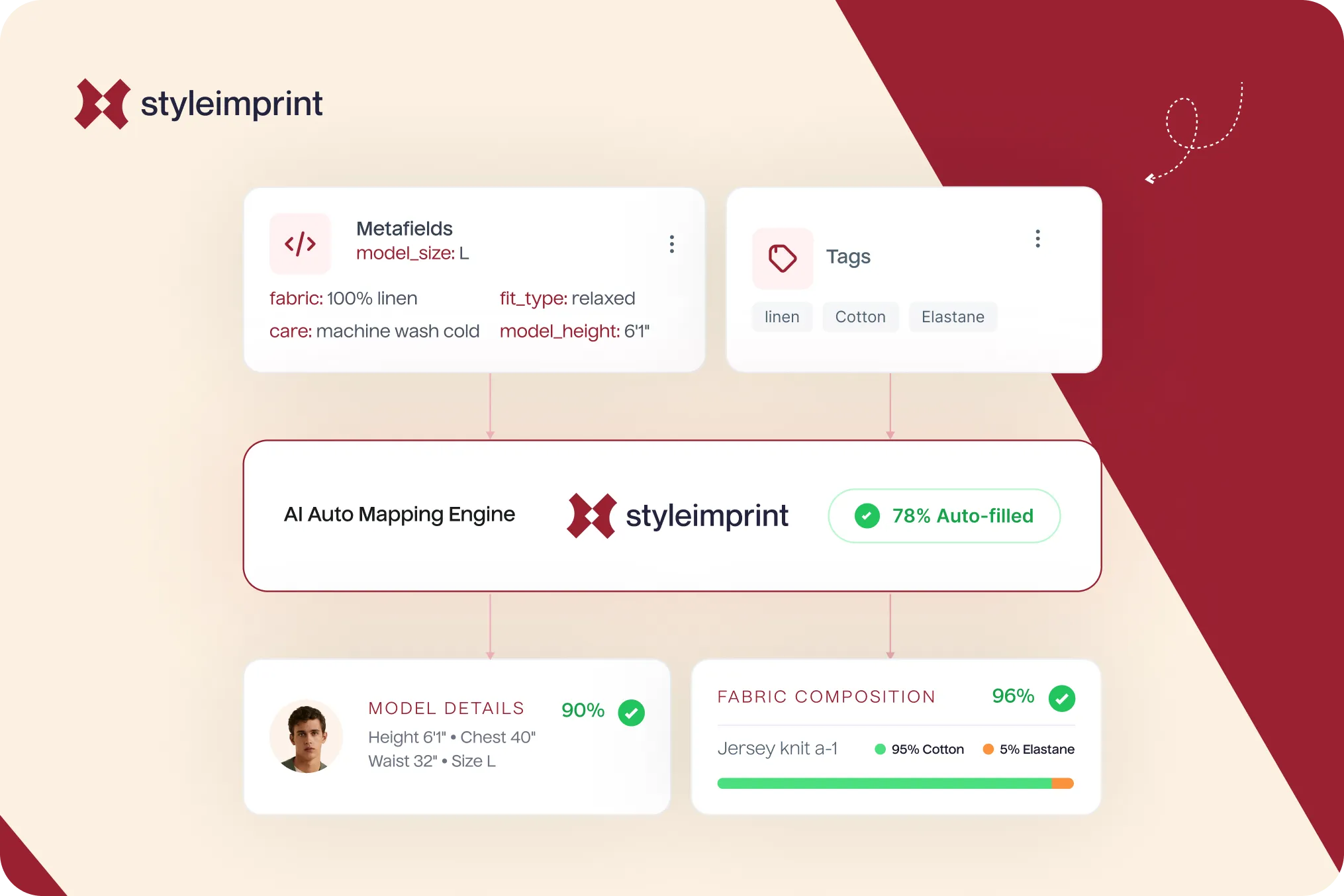
Every other post on this blog ends in roughly the same advice: get your fabric, fit, care, and model information out of the description and into structured fields, shown as scannable blocks. It is the fix for the five things most fashion product pages get wrong. And it runs straight into one wall: who is going to enter all of that, for every product, across a catalogue of 500 items?
That question is where most enrichment projects quietly die. This post is about how auto-map answers it, what it reads, how it decides what it is sure of, and what it does with the facts it cannot confirm. It is the most product-specific piece on the blog, because the mechanism is the point.
The 500-product problem
Shopify gives you real ways to add structured product data. You can define metafields and type values into the admin bulk editor. You can export a CSV, fill in metafield columns, and re-import, which Shopify now supports natively. You can drive it all through the API. Every one of these works. None of them solves the actual problem, which is not the mechanism but the labour: someone still has to know and enter the fabric, the weave, the care, and the fit for every single product.
For a store with 30 products that is an afternoon. For a store with 500, or 5,000, it is a project nobody starts, which is exactly why so many catalogues run on a title, a price, and a photo. The manual route does not scale, and that is the consensus pain point across every Shopify merchant who has tried to enrich a large catalogue by hand.
The insight: the data is already there
Here is the thing most enrichment tools miss. The facts are usually already in your store, just not in a structured form. A product titled “Banarasi Silk Saree, Red” already declares its garment type, its fabric, and its weave. A description might mention that a shirt is 100 percent cotton. Tags often carry occasion or fit. The product type field carries the category. The information exists; it is simply trapped in free text where neither a visual block nor an answer engine can use it.
Auto-map starts from that observation. Instead of asking you to type what your catalogue already knows, it reads the product data you have and turns the signals into structured fields.
What auto-map reads
On import, auto-map looks at the standard Shopify product fields that almost every store already populates:
- Title, often the richest single source, since it usually names the garment, the fabric, and sometimes the weave or fit.
- Description, where fabric composition, care, and fit details are commonly written in prose.
- Tags, which frequently encode occasion, season, fit, or collection.
- Product type and category, which give the garment class directly.
- Existing metafields, including Shopify’s own category metafields like fabric, where you have already filled them.
From those signals it infers the structured fields the visual blocks need: garment type, fabric, weave, fit, occasion, and a care preset suited to the material.
How it scores confidence, and why that matters
The important part is not that auto-map makes guesses, but that it knows how sure it is. Each inferred field is scored, and the scores fall into three honest buckets.
Confirmed. The signal is unambiguous. “Silk” in the title maps to a silk fabric field with high confidence. These fields are filled and ready.
Inferred. The signal is strong but worth a glance. A “Banarasi” weave strongly implies a silk, festive, dry-clean-only piece, so auto-map proposes those, marked for quick review rather than treated as certain.
Unknown. The data simply is not there. If nothing in the product states whether a saree includes a blouse piece, auto-map does not invent one. It flags the gap. This is the same discipline argued in the care and fabric guides: accurate and incomplete beats complete and wrong, especially on fields like fibre content where a wrong claim is a real problem.
A worked example: a Banarasi saree
Take a real-world product: “Banarasi Silk Saree, Red, with Zari Border.” From that title and a typical description, auto-map reads the garment type as saree and applies the saree template, sets fabric to silk and weave to Banarasi as confirmed, infers a delicate, dry-clean-only care preset because silk with zari demands it, and infers a festive or bridal occasion. What it does not find, the exact drape length and whether a blouse piece is included, it leaves flagged rather than fabricated.
In a few seconds, a product that was a title and a price becomes a structured saree listing that is most of the way to complete, with the two genuinely missing facts clearly marked for you to add. Multiply that across the catalogue and the enrichment project that never starts is suddenly most of the way done before you have typed anything.
The Mass Edit grid: fixing the gaps in one place
The flagged fields do not vanish into a report. Every product carrying a status such as needs_fabric or needs_blouse_piece is collected in a Mass Edit grid, a spreadsheet-style view where you fill the gaps across many products at once instead of opening each product in turn. Auto-map does the bulk of the work and hands you a precise, finite to-do list for the rest. That is the difference between “we should enrich our catalogue someday” and a task you can finish in a sitting.
In practice, this is why the onboarding goal is a catalogue that is 60 to 80 percent populated automatically on first import, in under a minute, with the remainder turned into a clear queue rather than a blank slate. The exact share depends on how descriptive your existing product data is: stores with rich titles and tags land near the top of that range, sparse catalogues lower, which is itself useful signal about where your data needs work.
Why this is the post that ties the others together
Every other guide here describes what a good fashion product page shows. This one is about making it actually happen across a real catalogue without a month of data entry. Auto-map reads what your store already knows, structures it, tells you honestly what it is sure of, and hands you a tidy list of the rest, with each garment template deciding which fields matter for which product type. You can try it on your own catalogue on the free plan and see how much of it fills itself in.
The short version
Structuring product data by hand does not scale past a few dozen products, which is why most catalogues stay thin. Auto-map works from the insight that the facts are usually already in your titles, descriptions, tags, product type, and metafields, just unstructured. It reads those signals, infers the structured fields the visual blocks need, scores how confident it is, fills the confirmed and inferred fields, and flags the unknowns instead of guessing. The result is a catalogue that is mostly enriched on first import and a short, precise list for the rest. The advice in every other post, finally, at catalogue scale.
Frequently Asked Questions
How does Shopify auto-detect product metafields?
Shopify itself does not auto-detect them; you define metafields and fill the values. Auto-map is StyleImprint's onboarding step that reads the product data already in your store, titles, descriptions, tags, product type, and existing metafields, and infers structured fields like garment type, fabric, weave, fit, and a care preset from it, scoring how confident it is in each.
Can I auto-fill product data on Shopify?
Yes, from the signals already in your catalog. A title like 'Banarasi Silk Saree' already states the garment type, fabric, and weave. Auto-map extracts those into structured fields automatically, which is far faster than typing them per product in the bulk editor or formatting a CSV by hand.
What product data does auto-map read?
The standard Shopify product fields: title, description, tags, product type, vendor, and any metafields you already have. These usually contain most of the facts a product page needs; they are just unstructured. Auto-map turns those signals into the structured fields that drive the visual blocks.
What happens to fields auto-map cannot confirm?
They are flagged, not guessed. Where a fact cannot be read reliably, the product is marked with a status such as needs_fabric or needs_care and surfaced in the Mass Edit grid, so you can fill the gaps deliberately in one place. Accurate and incomplete is treated as better than complete and wrong.